AI Typo Fixer • Powered by GPT Image 2

Edit Typos in Images with AI

One misspelled word on a finished graphic — upload the picture, type the correct spelling, and the AI redraws just that lettering. The design around it does not move, even with no source file in sight.

Upload an image to edit its text

Click to browse or drag & drop — the crop tool opens automatically

JPGPNGWEBPUp to 24MB
✒️
Font-preserving
Same typeface & weight
🧲
Context intact
Background untouched
⚡
30–90 seconds
GPT Image 2 engine
🔓
Commercial use
Download & own it
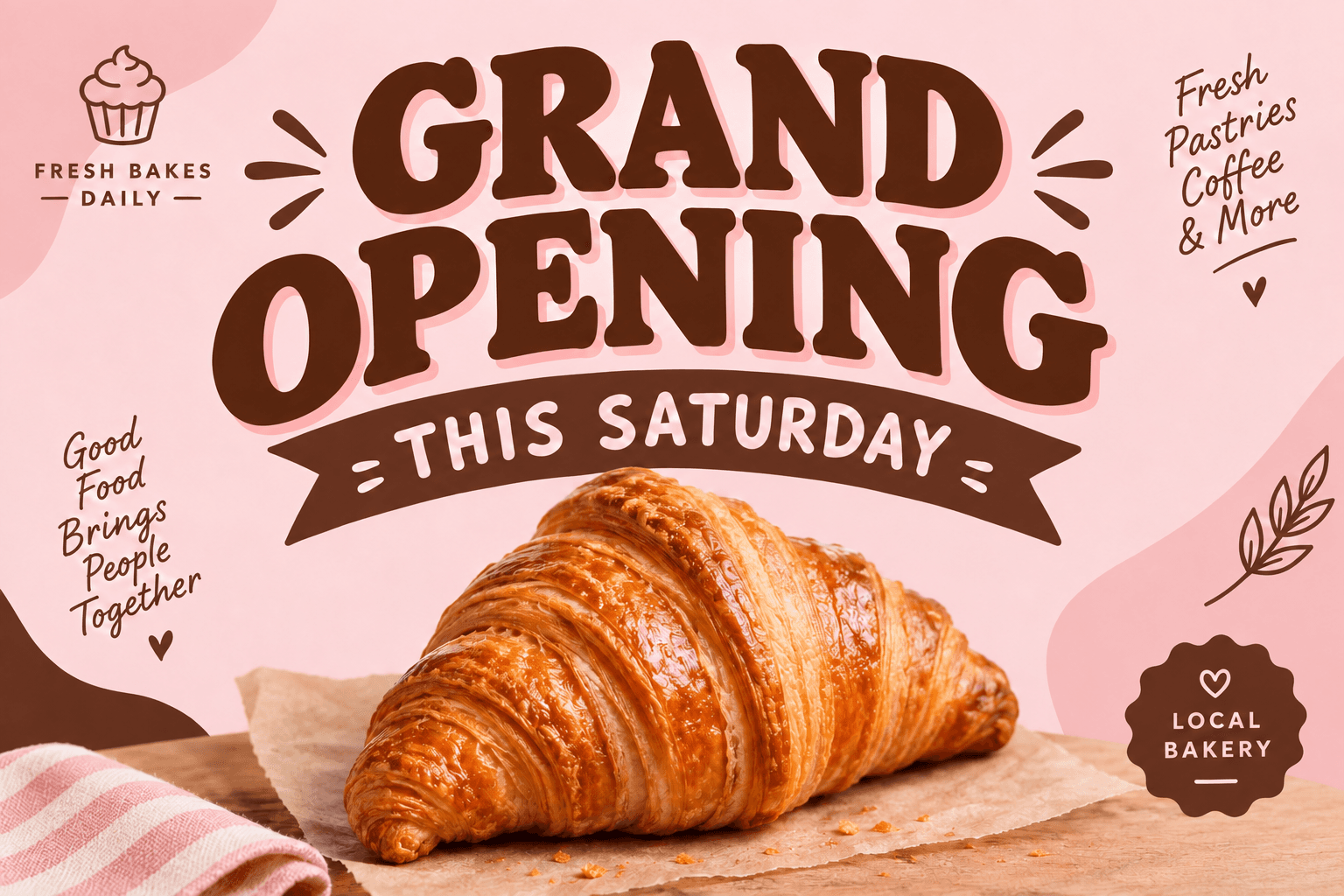
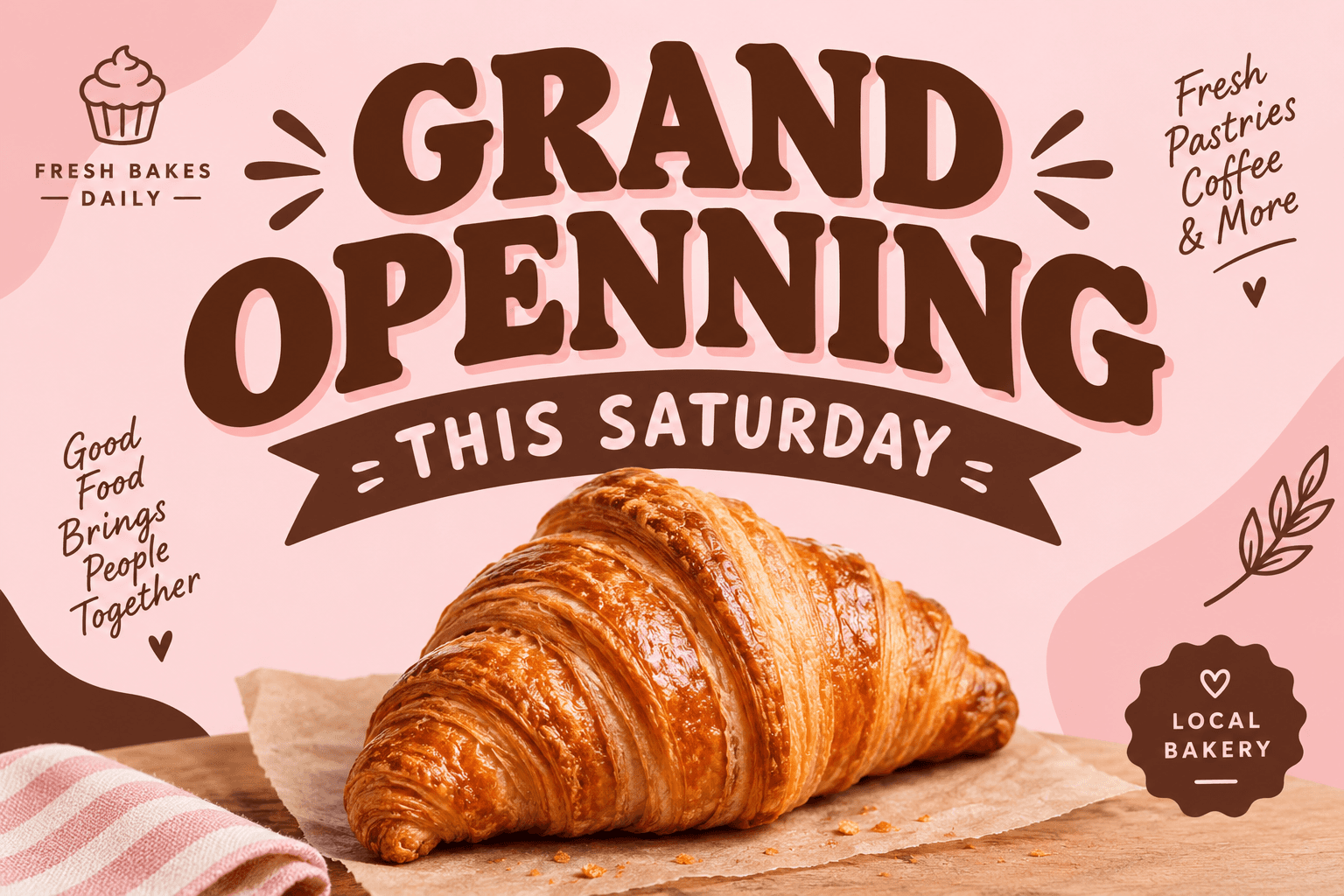
To edit typo in image files, upload the picture, type the misspelled text and its correct form, and generate. The AI re-renders only the flawed lettering — matching the original font, color, size and placement — while everything else in the design stays untouched. It works on flat exports with no source file, making it the fastest way to fix typos in printed, posted or approved artwork.

Edit typo in image — before & after example

Original image (faded)Image one
Original with background (faded)Image two

Drag the slider. The misspelled 'GRAND OPENNING' headline is corrected to 'GRAND OPENING' in the same bold typeface and pastel palette.

Edit typo in image artwork before anyone else notices

For the mistakes that survived every proofread — posters, posts, packaging and more.

🖨️

Print proofs & press runs

The error surfaced after files went to the printer. Edit typo in image proofs, resubmit the corrected export, and stop the run before the mistake multiplies.

📱

Live social posts

The caption thread spotted it twenty minutes after posting. Edit typo in image creative, swap the media in place, and keep the likes already banked.

🎪

Event flyers

A misspelled venue or host name undermines the whole event. Edit typo in image flyers and reprint-ready files without rebuilding the layout.

🏷️

Labels & packaging

Product photography is expensive; typos are not. Edit typo in image labels and mockups so the shoot survives one more revision round.

🖼️

Approved client artwork

The change is tiny but the designer moved on. Edit typo in image files the client approved — the correction stays invisible except to readers.

🖥️

Decks & export-only assets

Slides exported as images can hide stubborn errors. Edit typo in image exports instead of digging through folders for the original deck.

Why this typo fixer is different

A typo fix is the smallest possible edit with the highest possible stakes — so the tool is built to touch nothing except the mistake.

Surgical scope: Only the flawed lettering is redrawn. Imagery, textures and every other text block remain identical to the approved version.
No source file needed: Work from any flat export — the model identifies the typography from the pixels, not from a font menu.
Typography preserved: Serif, script, condensed or display type is re-rendered with matching weight, spacing and color.
Multi-error passes: Correct typo in picture text at several spots in one run by listing each fix in the instructions field.
Print-safe output: Download at full source resolution, ready to resubmit to a printer or swap into live campaigns.
One credit per fix: Free credits for new accounts and automatic refunds on failed generations — rescue work costs almost nothing to start.
How to edit typo in image files Background

How to edit typo in image files

01

Upload the flawed picture

Add the JPG, PNG or WEBP containing the mistake — highest resolution available. Crop to the affected region for maximum precision.

02

Type the correction

Enter the text exactly as misspelled, then the correct version. Use the notes field for extra errors or effects to preserve.

03

Fix & download

The AI redraws the lettering correctly in the original style. Preview, download, and resubmit or replace the asset wherever it lives.

The real cost of a typo baked into an image

Typos in documents are cheap — retype, save, resend. Typos in images are expensive because the words stopped being text the moment the design was exported. They became pixels welded to a background, and fixing them used to mean clone stamps, font archaeology and a lot of hopeful blending. When you edit typo in image files with AI instead, the correction is a typed instruction and the file behaves like editable text again.

The stakes rise with exposure. A misspelled headline on a printed poster exists in thousands of copies; the same mistake in a live campaign screenshot exists in every share and screenshot that follows it. Speed is the leverage: teams that edit typo in image artwork within minutes of noticing can correct course before the mistake earns its own comment thread.

There is also the human cost of the workaround. Rebuilding artwork from scratch to fix one word wastes the exact evening you do not have before a deadline, and recycled templates drift from the original design with every rebuild. A targeted fix keeps the approved composition approved — the correction changes letters, not the layout everyone already signed off on.

How to get an invisible correction

The best typo fix is one nobody can find, and that starts with precision at input time. Type the misspelled text exactly as it appears — doubled letters and wrong punctuation included — because the model anchors its search on what you give it. Vague inputs are the number-one cause of sloppy results when you edit typo in image artwork.

Protect the details that make lettering distinctive. If the text sits on a gold foil texture, glows, or overlaps a photo edge, say so in the instructions — 'keep the foil texture' or 'preserve the drop shadow' — and the redraw inherits those effects. The goal is a file where the only difference between before and after is the spelling, nothing else.

Finish with a proofing pass of your own. Zoom to full size and read every word, not just the fixed one, then check the corrected area against the original at the same zoom level. If anything drifted, run a second, smaller pass — chained micro-edits beat one overloaded prompt every time. That discipline is how professionals edit typo in image files so cleanly even the client never knows.

Edit Typo in Image — FAQ

Upload the picture, type the misspelled words exactly as they appear, type the correct spelling, and generate. The AI erases the flawed lettering and re-renders the corrected text in the same typeface, size, color and position. Most fixes finish in under two minutes, and you can edit typo in image formats including JPG, PNG and WEBP.
Yes, and that is the whole point. The tool works on the flat image itself, so missing layered files, uninstalled fonts and retired templates are irrelevant. To edit typo in image artwork you only need the exported picture — the model reads the typography straight off the pixels and redraws it correctly.
Misspellings, doubled letters, transposed characters, wrong punctuation, broken capitalization and misplaced spaces all fix reliably. You can also correct typo in picture text that is subtly wrong — 'you're' where 'your' belongs, an off-by-one year, a swapped digit in a phone number — anywhere the lettering is legible.
The edit is scoped to the lettering. Colors, imagery, textures, layout and every other block of text stay as they were. That restraint is what lets you edit typo in image artwork safely after approval — the corrected file remains visually identical to the version stakeholders already signed off on.
You can fix the image, and most platforms let you swap media without losing engagement — Instagram covers, Facebook edits and X media replacements all keep the post alive. Download the current image, edit typo in image copy here, then replace the media in place rather than deleting a post that already earned reach.
Yes. List every correction in the instructions field — for example 'fix the headline spelling, the date below it, and the URL at the bottom' — and supply each original and corrected phrase. One generation can edit typo in image text across the whole layout, which keeps spacing and hierarchy consistent between the fixes.
Legible handwriting and most script styles correct well, though heavily connected cursive can bleed at the boundaries. When you edit typo in image text set in script, include the full word or phrase rather than a single letter so the redrawn lettering joins up naturally. Print-style typefaces are the easiest cases.
New accounts receive free credits and each correction costs one credit — no plan needed for occasional rescues. If you proof batches of client artwork daily, credit packs on the pricing page are cheaper per edit. Any generation that fails is refunded automatically, so you never pay for a broken fix.

More AI Photo Tools

Explore our complete AI photo toolkit — every tool works on the same upload, so you can chain multiple edits in a single session.

Fix That Typo Now

Upload the image, type the correct spelling — original design preserved, no source file needed
