Free Photo Text Replacer • Powered by GPT Image 2

Replace Text in Photo Free

Type the words on the sign, label or shirt, type what they should say instead, and generate. The AI repaints the text in place — same font, same lighting, same angle. New accounts start with free credits, so your first photo text replacements cost nothing.

Upload an image to edit its text

Click to browse or drag & drop — the crop tool opens automatically

JPGPNGWEBPUp to 24MB
✒️
Font-preserving
Same typeface & weight
🧲
Context intact
Background untouched
⚡
30–90 seconds
GPT Image 2 engine
🔓
Commercial use
Download & own it
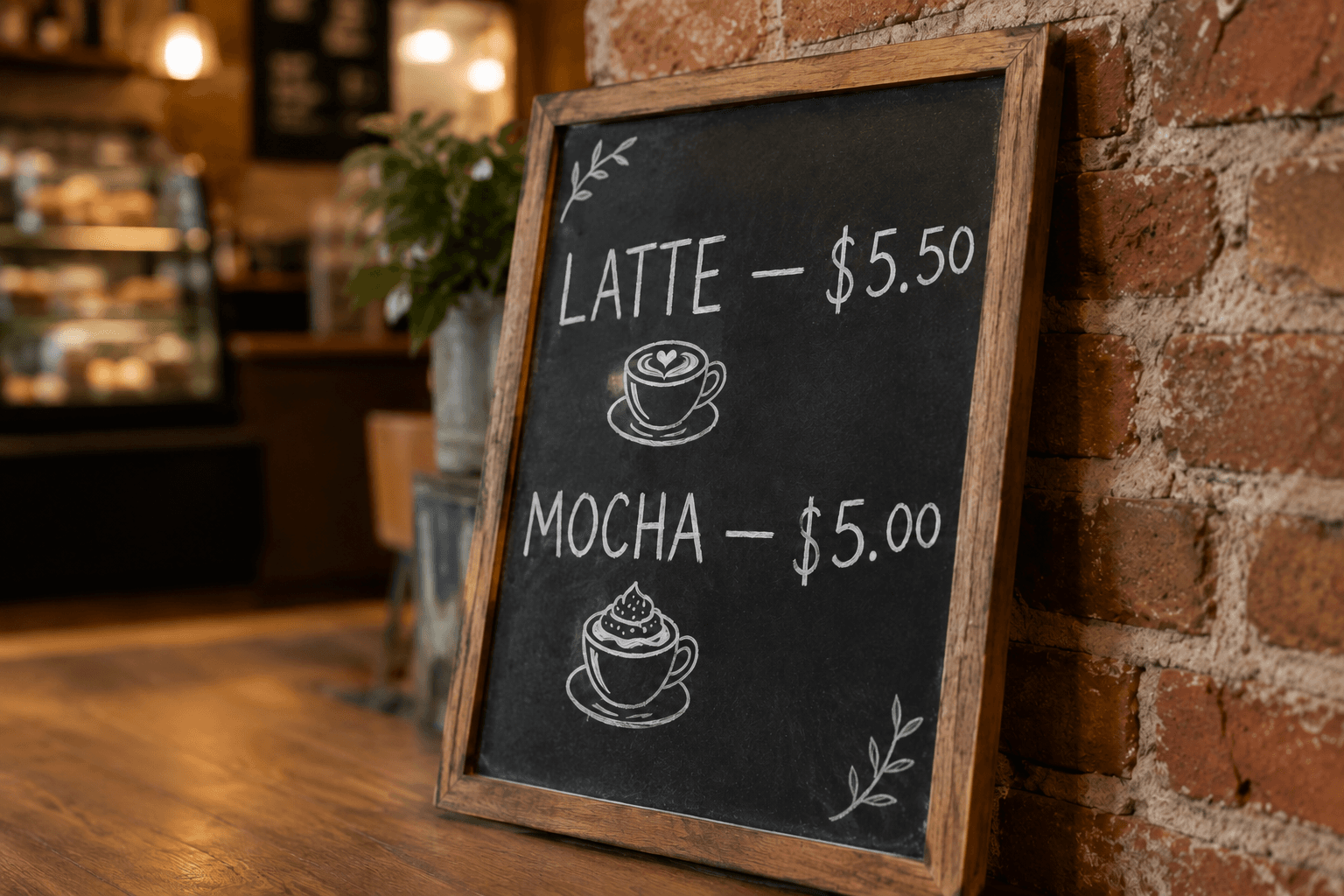
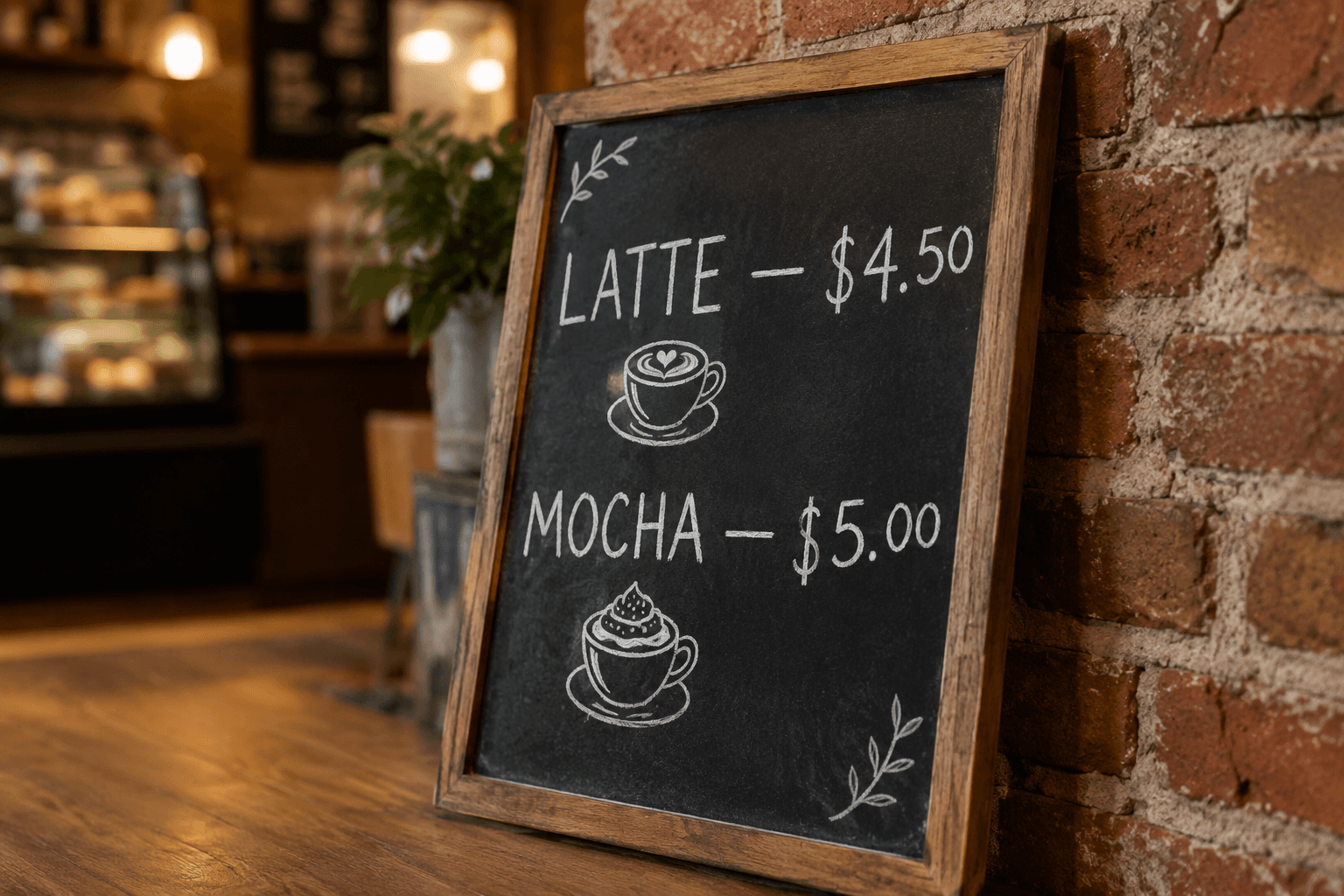
To replace text in photo files free, upload the picture, type the existing words, type the new ones, and generate. This free text replacement tool redraws the wording in place — matching the original font, color, shadows and perspective — so signs, labels and shirt prints look untouched. New accounts get free credits, no card required.

Replace text in photo — before & after example

Original image (faded)Image one
Original with background (faded)Image two

Drag the slider. The chalk price updates from $4.50 to $5.50 while the hand-lettering, chalk texture and lighting stay real.

Replace text in photo scenes people actually shoot

From storefronts to merch drops — one free text replacement tool covers the photographic cases.

🪧

Storefront & street signs

Opening hours changed, the phone number moved, the banner expired. Replace text in photo shots of your own signage instead of printing and re-hanging everything.

🏷️

Product labels

New flavor, new size, new claim. Replace text in photo shots of packaged goods and skip an entire studio session for a one-word label change.

👕

Shirts & merch

Test a slogan on the same hoodie mockup. Replace text in photo apparel shots to preview every phrase before you commit to a print run.

🍽️

Menus & boards

Prices move every season. Replace text in photo menus and chalkboards in seconds while the handwritten style stays completely intact.

🎪

Event banners

Same arch, new year. Replace text in photo banners from last year's event and reuse the entire shot for this one without a redesign.

🚗

Vehicles & decals

Rebrand the van without a wrap shop. Replace text in photo shots of door lettering and decals to preview the new name before printing.

What this free text replacement tool gets right

Photographs add perspective, texture and lighting that flat-design editors ignore. This tool is built for those scenes — and for budgets that start at zero.

Scene-aware redraw: The model reads the surface — brick, fabric, glass — before it replaces text in photo files, so the new words belong in the scene.
Automatic font matching: Typeface, weight and color are inherited from the original wording; no font hunting, no font downloads, no guessing.
Perspective kept: Angled signs and curved labels keep their geometry — the replacement bends with the surface it was printed on.
Crop before you edit: Frame just the sign, label or shirt print for tighter, faster and noticeably more accurate replacements.
One credit per edit: A single credit replaces one block of text — replace text in image files as often as you like without a subscription.
Free credits on signup: New accounts start with free credits, so you can replace text in photo files free the moment you sign up.
How to replace text in photo files free Background

How to replace text in photo files free

01

Upload the photo

Drop in the JPG or PNG with the wording you want changed. Crop to the sign, label or shirt region for the tightest match.

02

Type the swap

Enter the original text exactly as photographed, then the replacement. Add instructions for extra lines or areas to leave alone.

03

Generate & download

The AI replaces the text in the photo in about a minute. Preview it, download at full quality, or run another pass to refine.

Why replacing text in photos used to be a specialist job

Photographed text is welded to the real world. The letters sit on brick, glass, fabric or cardboard, with perspective, shadows and weathering baked into every stroke. Before AI, to replace text in photo files meant clone-stamping the old wording away, guessing the typeface, retyping the line and hand-painting the texture back — an hour of skilled retouching for a two-word swap on a sign.

This free text replacement tool takes a different route. You describe the change — original text in, new text out — and a multimodal model repaints the region so the replacement inherits the sign's angle, the label's gloss and the shirt's weave. The result should look like the photo was always taken with the new wording in place, which is the only standard that matters.

The free part is deliberate. Sign updates, menu price changes and merch mockups are small, frequent jobs, and a monthly plan for them feels wrong. New accounts start with free credits and each swap costs one credit, so you can replace text in photo files free for your first edits and only pay when the edits keep coming — no subscription required to keep the workflow alive.

Getting a clean free replacement every time

Start with the sharpest photo you have. Letterforms that fill a few hundred pixels give the model real detail to match; a compressed thumbnail forces it to guess. If the original is soft, run it through an upscaler first, then replace text in image files from the enlarged version for crisper, more believable typography on the finished photo.

Type the original wording exactly — punctuation, capitalization, spacing — because the model anchors on what you give it. If a phrase appears twice and only one instance should change, say which one in the instructions. Then name anything the model should protect: keep the reflections on the glass, or do not touch the small print under the sign.

Finally, iterate in small passes. Change the headline, check the result, then change the date line. Editors who replace text in photo files every day chain two or three micro-edits rather than forcing one perfect prompt, and the free credits that come with a new account are exactly enough to learn that rhythm before you spend a cent.

Replace Text in Photo Free — FAQ

Upload the photo, type the words exactly as they appear, type the replacement, and click Generate. The AI repaints the wording in place while the font, shadows, surface texture and angle stay as they were. New accounts include free credits and no credit card, so you can replace text in photo files free before spending anything.
Yes. Every new account starts with free credits and each text replacement costs a single credit, which makes it a genuinely free text replacement tool for your first edits. You can replace text in image files for free to learn the workflow, then grab affordable credit packs only if you keep editing. No subscription is required to try it.
Signs, price tags, product labels, shirt prints, menus, banners and packaging — any photo where the wording is legible and reasonably large. The sharper the letters, the better the model can match them. You can replace text in photo captures taken on a phone as long as the words are readable and not blurred by motion.
In most cases, yes. The model reads the typeface, weight, color, shadows and the angle of the surface before it redraws anything. When you replace text in photo scenes here, the new wording inherits those properties, so curved bottle labels and angled storefront signs keep their geometry instead of floating flat on top of the picture.
Yes. Fabric is one of the trickier surfaces and the editor handles folds, weave texture and printing imperfections reasonably well. For the best result, crop to the printed area first, then replace text in photo sections where the shirt is laid flat and evenly lit — the model simply has more visual context to reconstruct the surface convincingly.
Most free photo editors stamp a new text layer on top of the old one, and the original wording still shows underneath. This free text replacement tool removes the old lettering and re-renders your new text in its place, so nothing overlaps and the photo still reads as a single, unedited shot — the difference between an overlay and an actual replacement.
No. The editor runs entirely in your browser on desktop and mobile, so you can replace text in photo files straight from a phone camera roll without installing an app. Upload, crop, type the change, generate and download — the whole free text replacement workflow takes about a minute per edit from start to finish.
Only photos you own or are licensed to modify — your product shots, your signage mockups, your merch designs. Do not replace text in photo captures of IDs, certificates, tickets or legal documents, and never use the free text replacement tool to misrepresent what a sign, notice or label really said. Those edits are refused.

More AI Photo Tools

Explore our complete AI photo toolkit — every tool works on the same upload, so you can chain multiple edits in a single session.

Replace Text in Photo Free Now

Signs, labels, shirts — new words, same font, lighting and angle
