AI Text Fixer • Powered by GPT Image 2

Fix Garbled Text in AI-Generated Images with AI

That almost-perfect generation with one mangled word? Upload it, type what the text should say, and GPT Image 2 repairs the lettering in place — the artwork around it doesn't move a pixel.

Upload an image to edit its text

Click to browse or drag & drop — the crop tool opens automatically

JPGPNGWEBPUp to 24MB
✒️
Font-preserving
Same typeface & weight
🧲
Context intact
Background untouched
⚡
30–90 seconds
GPT Image 2 engine
🔓
Commercial use
Download & own it
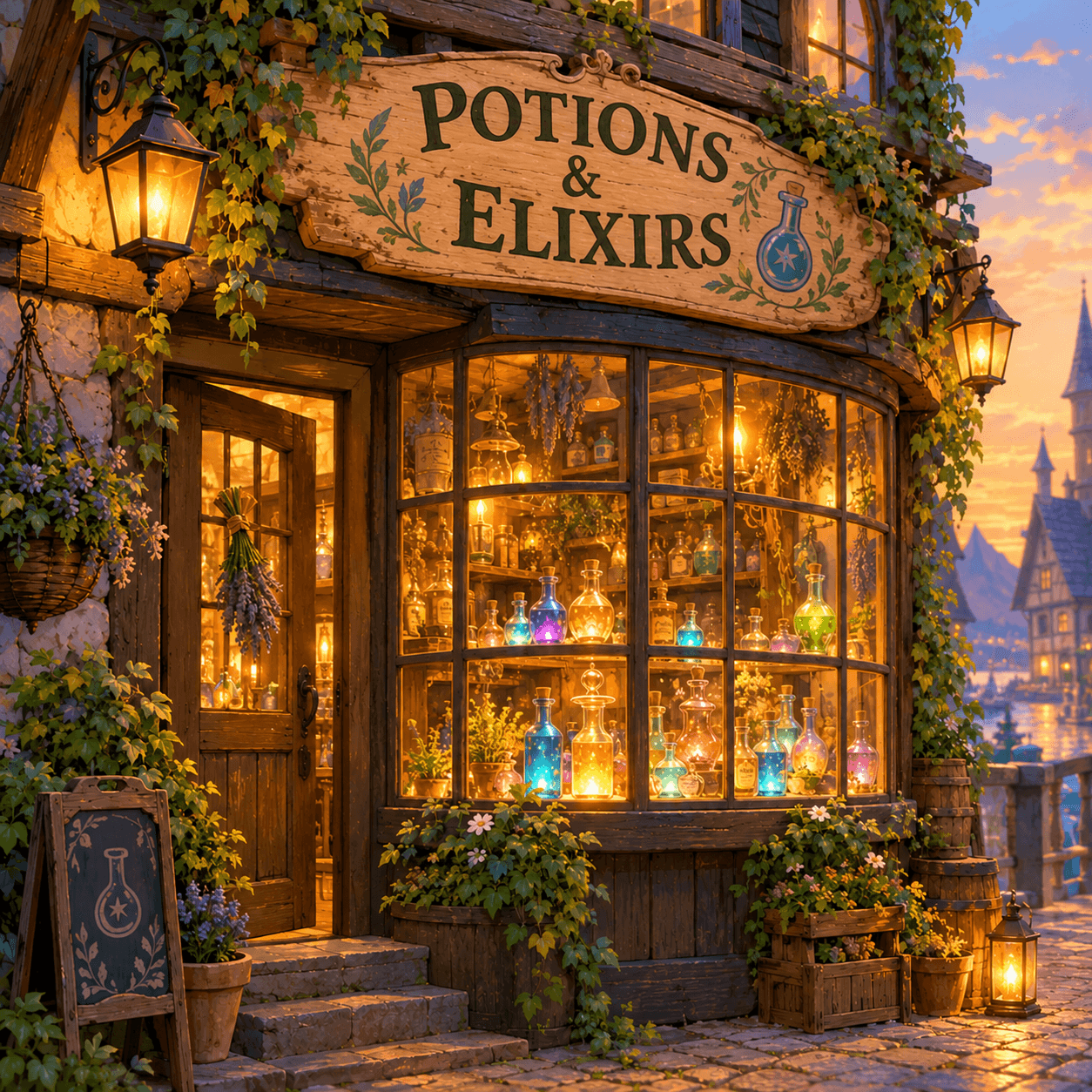
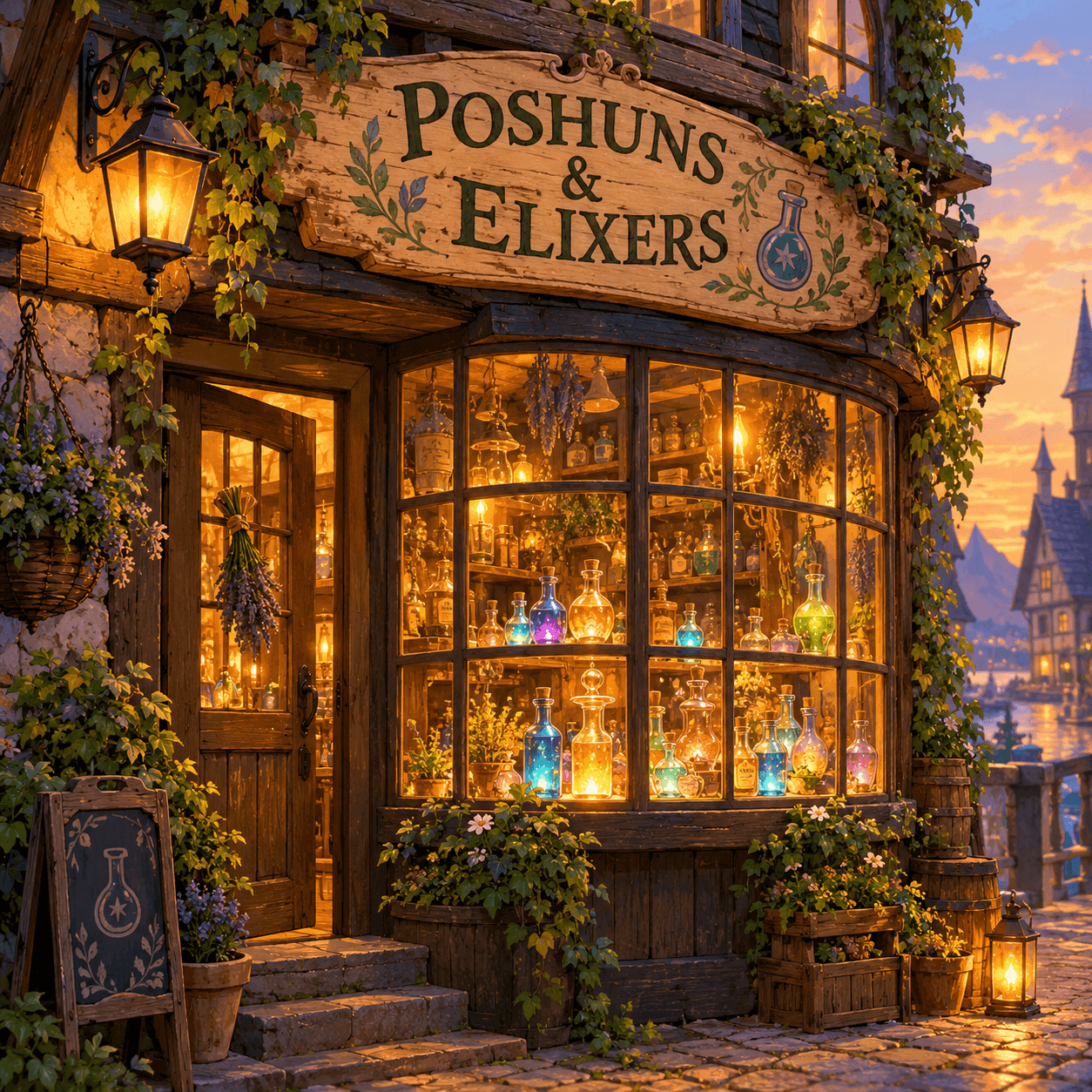
To fix garbled text in AI-generated images, upload the image, type the correct wording, and generate. GPT Image 2 finds the misspelled or distorted lettering and re-renders it cleanly in the same style, while the surrounding artwork — subject, colors, lighting and composition — stays exactly as the generator produced it. Works on images from Midjourney, DALL·E, Flux and every other generator.

Fix AI image text — before & after example

Original image (faded)Image one
Original with background (faded)Image two

Drag the slider. The garbled 'POSHUNS & ELIXERS' sign is re-rendered as a correctly spelled 'POTIONS & ELIXIRS' in the same hand-painted style.

Every kind of AI text failure, fixed

If your generator can paint it but can't spell it, this is the tool.

🔤

Misspelled headlines

The poster looks stunning but the title reads 'CONCERT' with two Rs. Fix garbled text in AI-generated images without touching the layout.

🌀

Warped letterforms

Letters that melt, double or trail into swirls get re-rendered as clean, readable glyphs in the original style.

🏮

Broken signage

Neon signs, shop windows and billboards in generated scenes get their wording corrected while the glow stays on.

📦

Product label typos

Generated packaging mockups with gibberish brand names become presentation-ready with one targeted fix.

🖼️

Logo & wordmark garble

Fix the lettering in a generated logo concept before you show it to anyone — no re-prompting, no re-rolling.

🔁

Batch rescue

Fix garbled text in AI-generated images one at a time as you review a batch, salvaging the compositions worth keeping.

Why re-fixing beats re-generating

You already have the composition, the lighting and the mood you wanted. The only broken thing is the spelling. Fix that — keep everything else.

Targeted repair: Only the lettering is re-rendered; the artwork you spent rolls of generation on stays identical.
Style-matched glyphs: Neon stays neon, chalk stays chalk — corrections inherit the intended typography of the design.
No prompt archaeology: Skip hunting for the seed and prompt that got you 90% there. Fix garbled text in AI-generated output directly.
Readable-anchor optional: Can't transcribe the gibberish? Leave the original field blank and just type the correct text.
Works with every generator: Midjourney, DALL·E, Stable Diffusion, Flux, Nano Banana — the fixer edits the image, not the model.
One credit per fix: Free credits for new accounts. Failed generations are auto-refunded, so you only pay for results.
How to fix garbled text in AI-generated images Background

How to fix garbled text in AI-generated images

01

Upload the generation

Drop in the AI image with the broken lettering. Crop to the sign or headline if the artwork is complex.

02

Type the correct text

Enter what the text should say. Optionally transcribe the garble to anchor the model — hints like 'keep the neon glow' help.

03

Fix & download

GPT Image 2 repairs the lettering in place. Compare, download, or run another pass on any remaining flaws.

The AI text problem, explained

AI image generators are extraordinary scene painters and terrible typesetters. A diffusion model learns that signs near diners tend to have rounded letters, so it paints statistically plausible letter-shapes — and statistics don't spell. The result is the now-familiar garble: 'OPEN' with a backwards E, quotes that curl into spirals, brand names that are almost words. GPT Image 2 changed this equation with far stronger native text rendering, and that same strength is what makes it the ideal tool to fix garbled text in AI-generated images made by weaker-spelling models.

The alternative workflows all hurt. Re-rolling the generation plays slot machines with your composition: fix the spelling, lose the pose. Manual Photoshop repair means cloning, font hunting and blending over textured backgrounds. Prompting harder ('make sure the sign says OPEN, spelled correctly') burns attempts and often warps other details. A dedicated AI text fixer does the surgical thing — read the flawed glyphs, understand the intended typography, repaint just that region.

Teams that generate lots of concept art treat this as a standard second step: generate for composition, then fix garbled text in AI-generated finalists. It's cheaper than re-rolling and keeps the versions comparable, since only the lettering changes between review passes.

Getting the cleanest repairs

Type the corrected text with the exact capitalization and punctuation you want — the fixer renders what you give it. If the garble is legible enough to transcribe, filling the optional original field helps the model locate and replace precisely the broken glyphs rather than hunting the whole scene.

Scoped instructions beat vague ones: 'fix only the hanging sign, keep the graffiti on the left wall' protects details you like. And for text with strong effects — neon, embroidery, frosting on a cake — mention the effect so the repair inherits it. When you fix garbled text in AI-generated images with complex styling, the hint about the style matters as much as the corrected words.

Finally, review at full size. AI lettering hides its flaws at thumbnail scale; zoom to 100% and check every word, then chain a second pass for anything still off. Each pass is one credit and keeps everything but the text locked in place — that's the entire point.

Fix Garbled AI Text — FAQ

Diffusion models paint pixels from learned patterns; they don't typeset. When a generator like Midjourney or DALL·E draws lettering, each glyph is an artistic guess — close, but often misspelled or warped. To fix garbled text in AI-generated images, you need a model that can both read the flawed lettering and re-render it correctly, which is exactly what this text fixer does.
Upload your AI image, type what the text SHOULD say in the corrected-text field, and generate. GPT Image 2 locates the broken lettering and re-renders it cleanly while keeping the artwork, colors, lighting and composition exactly as they were. If the garble is readable, type it in the optional original field to help the model anchor.
Images from Midjourney, DALL·E, Stable Diffusion, Flux, Nano Banana, Ideogram and any other generator can be fixed. The text fixer works on the output image itself, so the source model doesn't matter — only the picture does.
No. The edit is scoped to the lettering: style, colors, subject, lighting and composition of the surrounding artwork are preserved. That's the difference between a targeted AI text fixer and re-generating the whole image with a new prompt and losing the composition you liked.
Short headlines, titles, labels and signs fix reliably. Long paragraphs are harder — the more words, the more chances for new typos. For paragraph-length fixes, edit in a couple of passes, or fix the headline here and set body copy in a design tool.
Even better. Our own AI image generator produces strong text rendering, but when a generation still mangles a word, feed the result straight into this fixer — it's the intended second step of the pipeline. Generate, fix garbled text in AI-generated results, download.
Yes. The fixer matches the intended typography of the design — a neon sign keeps its neon, a chalkboard keeps its chalk. The correction is a repair, not a replacement with a generic font.
New accounts include free credits and each fix costs one credit. Fix garbled text in AI-generated images at no cost to start; credit packs and plans are available when you're fixing at volume.

More AI Photo Tools

Explore our complete AI photo toolkit — every tool works on the same upload, so you can chain multiple edits in a single session.

Fix Your AI Image's Text

Keep the art, correct the spelling — one targeted edit with GPT Image 2
